Connection blocked
The iPhone shows a Connection Blocked sheet or a firewall warning. Let PreviewMonitor through the firewall on Windows, or allow Local Network on a Mac.
"The iPhone says Connection Blocked."
The iPhone can see your computer on the Wi-Fi, but something on the computer refuses the connection. On Windows that is the firewall. On a Mac it is either the firewall or the Local Network permission for Premiere or After Effects. The fix happens on the computer, and the sheet on the iPhone tells you which one you need.
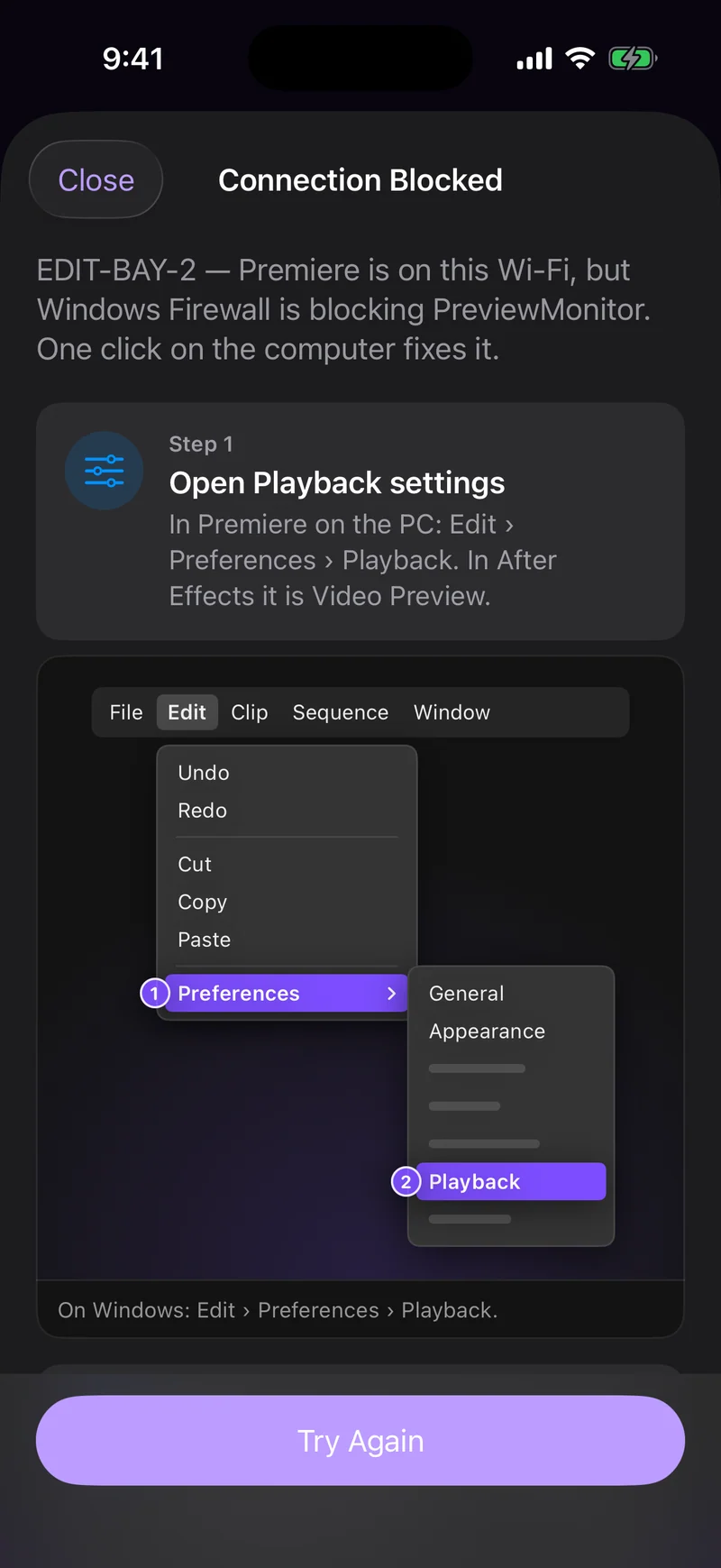 The first lines of the sheet name the computer and the cause. The steps below them change to match.
Try this first
Windows PC, sheet says "One click on the computer fixes it":
- In Premiere, open Edit › Preferences › Playback. In After Effects, open Video Preview in the same menu.
- Click the gear on the PreviewMonitor row to open the Setup window.
- Click Fix in the firewall warning at the top of the window.
- Choose Yes when Windows asks for permission.
The iPhone connects by itself as soon as the computer lets it in.
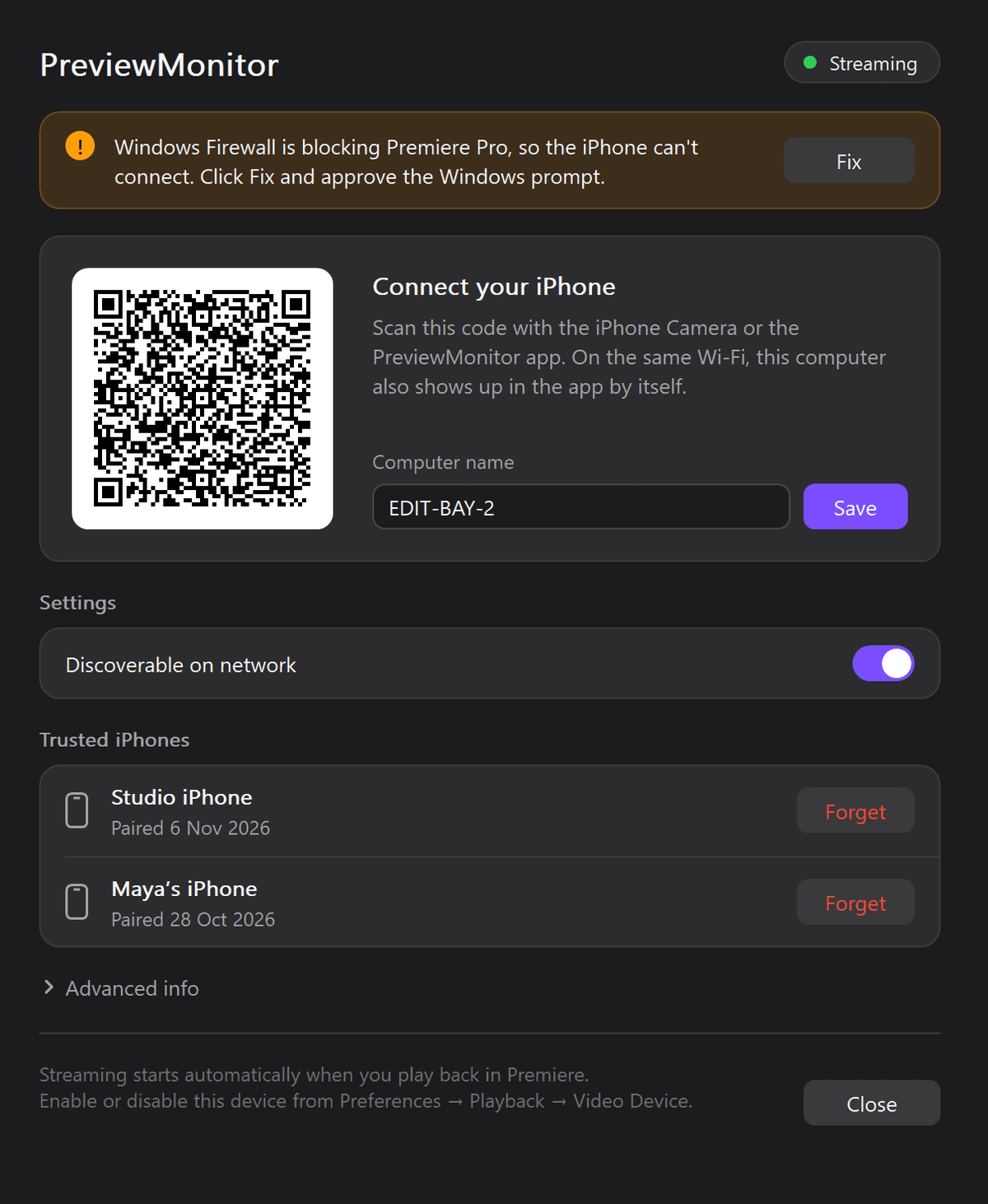 The Setup window's firewall warning. Fix asks Windows for permission once, switches off the rules that block Premiere and After Effects, and puts PreviewMonitor's own rules back.
Mac: go to System Settings › Privacy & Security › Local Network, turn on Premiere (or After Effects), then quit and reopen it. Tap Try Again on the iPhone.
If that didn't work
The sheet's opening line tells you which case you're in.
1. "…its Windows Firewall is set to block all incoming connections"
Windows is blocking every incoming connection, including allowed apps, so Fix can't help.
Fix: on the PC, open Windows Security › Firewall & network protection and click the network marked (active). Under Incoming connections, clear Blocks all incoming connections, including those in the list of allowed apps. On a work computer this setting often comes from IT. Ask them to allow PreviewMonitor on the local network.
2. "…a Windows Firewall rule on it blocks PreviewMonitor"
A separate firewall rule blocks PreviewMonitor.
Fix: on the PC, open Windows Defender Firewall › Advanced settings › Inbound Rules. Find the enabled rule with a block sign that covers PreviewMonitor and choose Disable Rule. If IT set the rule, send them Network and firewall, which lists everything PreviewMonitor needs.
3. "…it isn’t answering. Something on the computer is blocking the connection"
The iPhone can't tell what is blocking it. Pick Mac or Windows at the top of the sheet to see the steps for your computer.
On a Mac:
- Open System Settings › Network › Firewall, then Options….
- Set Adobe Premiere (or After Effects) to Allow incoming connections and click OK.
- If it still fails, open System Settings › Privacy & Security › Local Network, turn on Premiere or After Effects, and restart it.
On Windows, follow the Fix steps at the top of this page.
Then tap Try Again on the iPhone.
4. The Mac's Setup window shows a Local Network warning
When Premiere has no Local Network access on a Mac, the plugin's Setup window shows a banner with an Open Settings button, and the live view may show Premiere has no Local Network access on this Mac. Click Open Settings, turn on Premiere or After Effects, then quit and reopen it.
5. The warning line in the live view mentions the firewall
Once connected, the iPhone can still warn you with an orange line at the top:
| Line | Fix |
|---|---|
| Windows Firewall is blocking Premiere | Fix in the Setup window, as above |
| Windows Firewall has no rule for PreviewMonitor | Fix in the Setup window, as above |
| Windows treats this network as Public | Set the network to Private in Windows Settings › Network & internet |
| Premiere has no Local Network access on this Mac | Allow it under Privacy & Security › Local Network |
These lines say "Premiere" on After Effects connections too.
6. The iPhone's own Local Network permission is off
This one doesn't produce the Connection Blocked sheet. The computer never appears on Home. Computer missing from Home shows how to check and turn it on.
Still blocked
Security software other than Windows Firewall, or a network that blocks devices from reaching each other, can also stop the connection. Give your IT team Network and firewall. If the computer is yours and nothing above helps, send the plugin logs through Contact (Logs and support reports shows how), and say what the opening line of the sheet said.
Last updated on